





In the fall of 2026, all policy related documents, including payroll audit statements (PHS123) and notices of cancellation, etc. will no longer be mailed. The payroll audit statement will be emailed when emailed to the policyholder and all other policy related documents will continue to be delivered electronically through Interactive, with email notifications serving as the primary method of communication when selected through Interactive.
This change provides faster access to important policy documents while making it easier to view, download, and manage statements online.


What’s Changing
Beginning Friday, October 29, 2026:
- All policy related documents will no longer be mailed.
- The payroll audit statement will be emailed. All policy related documents will continue to be available through Interactive.
- When you opt in, email notifications are available for most new statements/notices through Interactive when available.
- All policy related documents can be viewed, downloaded, or printed from Interactive at any time.
Nothing else about the policy process is changing, including all current mailings to the policyholder regarding their policy.
Why We’re Making This Change
Moving all policy related documents to digital delivery allows us to provide information more quickly and efficiently while giving Agent Partners convenient, anytime access to important documents through Interactive.
Digital delivery also helps reduce paper usage and ensures statements/notices are available whenever you need them.
Accessing Policy Related Documents
Accessing your policy related documents is simple through Interactive.
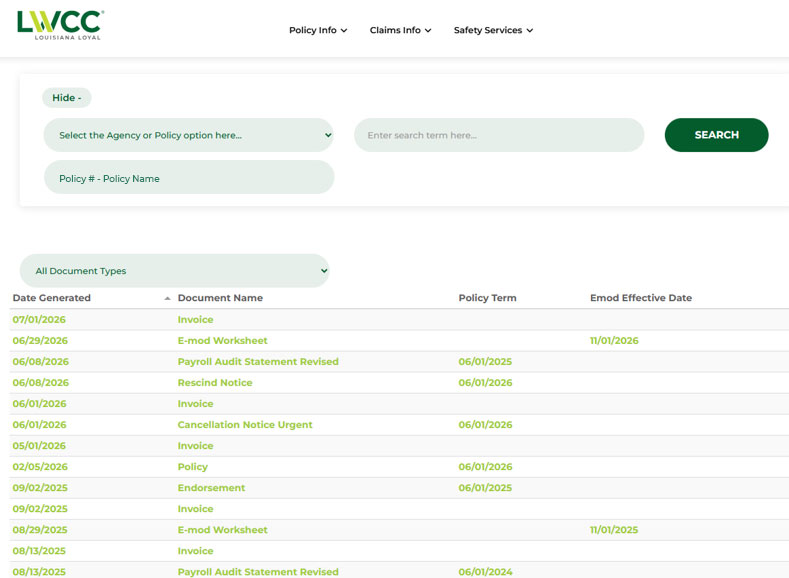
Once you've logged in to your account:
- Select Agency or Policy option box
- Select Policy from the drop-down menu
- Click search term here box
- Enter the policy number
- On the menu tab, select Policy Info
- On the drop-down menu, select Policy Documents
- Click hyperlink for desired document
The list can be sorted by selecting All Documents Type and selecting document from drop-down menu.
Click here if you do not yet have an account or need assistance with account access.
Managing Notifications
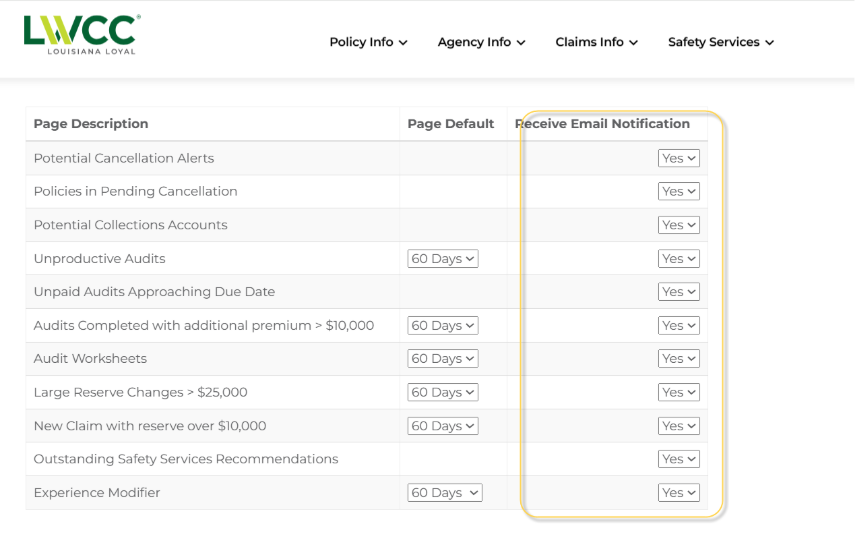
To manage your preferences for notifications on Interactive:
- Log into Interactive
- Select agency
- Click the Agency Info drop down and select Agency Dashboard Settings

- Toggle on the desired notifications under “Receive Email Notification”
FAQs
Q: Will all policy related documents still be available?
A: Yes. All policy related documents will continue to be available through Interactive.
Q: Will I receive a notification when a statement is available?
A: Yes. When you opt-in for email notifications through Interactive, an email alert will be sent when most policy related documents become available.
Q: Can I still print a copy?
A: Yes. All policy related documents may be downloaded and printed directly from Interactive whenever needed.
Q: Do I need to do anything before Fall 2026?
A: If your agency already uses Interactive, you have opted in to notifications, and your email information is current, no action is required. If you need assistance accessing Interactive, opting in, or updating your contact information, please contact us. Click here if you do not yet have an account or need assistance with account access.
Need Help? Have Questions?
If you have questions or need assistance, our team is here to help.
Phone: 225-924-7788 | Email: information@lwcc.com
MEET THE SPEAKER
EVENT DETAILS
Related resources


Related news

Daymond John Shares the Power of Purpose-Driven Business
Daymond John, founder of FUBU and star of ABC’s “Shark Tank” was featured in LWCC’s Speaker Series on May 18. From the stage of the Foster Learning Center, he shared his personal story of success and the importance of purpose-driven business with a focus on the greater good.
Frequently asked questions
This is a sample two line introductory paragraph that serves as an intro on the blog/article preview. This is just sample text serving as a placeholder.

This is a sample two line introductory paragraph that serves as an intro on the blog/article preview. This is just sample text serving as a placeholder.This is a sample two line introductory paragraph that serves as an intro on the blog/article preview. This is just sample text serving as a placeholder.This is a sample two line introductory paragraph that serves as an intro on the blog/article preview.
This is a sample two line introductory paragraph that serves as an intro on the blog/article preview. This is just sample text serving as a placeholder.This is a sample two line introductory paragraph that serves as an intro on the blog/article preview. This is just sample text serving as a placeholder.This is a sample two line introductory paragraph that serves as an intro on the blog/article preview.
This is a sample two line introductory paragraph that serves as an intro on the blog/article preview. This is just sample text serving as a placeholder.This is a sample two line introductory paragraph that serves as an intro on the blog/article preview. This is just sample text serving as a placeholder.This is a sample two line introductory paragraph that serves as an intro on the blog/article preview.
This is a sample two line introductory paragraph that serves as an intro on the blog/article preview. This is just sample text serving as a placeholder.This is a sample two line introductory paragraph that serves as an intro on the blog/article preview. This is just sample text serving as a placeholder.This is a sample two line introductory paragraph that serves as an intro on the blog/article preview.
This is a sample two line introductory paragraph that serves as an intro on the blog/article preview. This is just sample text serving as a placeholder.This is a sample two line introductory paragraph that serves as an intro on the blog/article preview. This is just sample text serving as a placeholder.This is a sample two line introductory paragraph that serves as an intro on the blog/article preview.
This is a sample two line introductory paragraph that serves as an intro on the blog/article preview. This is just sample text serving as a placeholder.This is a sample two line introductory paragraph that serves as an intro on the blog/article preview. This is just sample text serving as a placeholder.This is a sample two line introductory paragraph that serves as an intro on the blog/article preview.


